Key Takeaways
- A11Y stands for accessibility, emphasizing inclusive digital design for all users.
- It ensures compliance with global standards like WCAG, ADA, and Section 508.
- Following an a11y checklist helps maintain consistent accessibility across platforms.
- Tools like PREP by Continual Engine automate and streamline accessibility workflows.
- Prioritizing a11y rules builds trust, fosters inclusivity, and enhances digital experiences for everyone.
What is A11Y?
What is the Importance of A11Y?
- Inclusivity: It ensures that all individuals, including people with disabilities, can access digital content without barriers.
- Legal Compliance: It helps organizations meet accessibility mandates such as the ADA, Section 508, and WCAG guidelines, reducing legal risks.
- SEO & Performance: Search engines favor accessible websites, leading to better visibility and engagement.
- Better User Experience: Accessibility features, like high color contrast, keyboard navigation, and readable typography, make every user’s experience better, benefiting everyone.
What are Key A11Y Standards & Guidelines?
- Perceivable: Users must be able to perceive the content presented. Information should be available in multiple formats so that it can be detected by assistive tools like screen readers.
- Operable: Users must be able to interact with and navigate the interface using different input methods, such as a keyboard or voice commands.
- Understandable: The information and user interface should be easy to comprehend, using clear language, logical structure, and consistent design patterns.
- Robust: Digital content should be compatible with a wide range of browsers, devices, and assistive technology, ensuring it remains accessible even as technology evolves.
What is A11Y Compliance?
How to Achieve A11Y Compliance
-
Section 508
Section 508 is a U.S. federal law that requires accessibility for federally funded websites and electronic information technologies, ensuring usability for individuals with visual and cognitive impairments.
-
WCAG (Web Content Accessibility Guidelines)
WCAG is an internationally recognized set of guidelines for making web content more accessible to a wide range of people with visual and cognitive impairments.
-
ADA (Americans With Disabilities Act)
ADA mandates that certain businesses and organizations provide accessible accommodations for individuals with visual and cognitive impairments.
What are the A11Y Components?
- Semantic Code: Using HTML elements that clearly describe their content for assistive technologies like screen readers.
- Keyboard Navigation: Enabling users to navigate the application solely with a keyboard.
- Alternative Text: Providing descriptions for images to convey their meaning to screen reader users.
- Headings: Structuring content with clear and logical headings to improve navigation.
- Lists: Utilizing ordered and unordered lists to organize content for easier comprehension.
- Form Controls: Designing accessible forms with clear labels, error messages, and keyboard functionality.
- Tables: Ensuring tables have proper structure and captions for screen reader users.
- Multimedia: Providing captions and transcripts for video and audio content.
A11Y Checklist for Web & Mobile Applications
-
Content & Structure
- Headings: Use headings hierarchically (H1-H6) to organize content and maintain a logical page structure.
- Images: Provide descriptive alt text for all meaningful images so that screen readers can interpret and announce them accurately.
- Tables: Structure tables with headers, captions, and summaries to ensure they are understandable for assistive technologies.
- Language: Use clear, concise, and straightforward language to make information easy to read and understand.
- Lists: Format ordered and unordered lists properly to maintain content hierarchy and readability.
-
Keyboard & Navigation
- Keyboard Navigation: Ensure all features and interactive elements can be accessed and operated using a keyboard alone.
- Focus Management: Maintain a logical and intuitive focus order that matches the visual flow of the application.
- Consistent Navigation: Keep navigation and layout consistent across all pages and screens to help users find information easily.
-
Appearance & Readability
- Color Contrast: Maintain sufficient color contrast between text and background (at least 4.5:1 for normal text, 3:1 for large text).
- Readability: Use legible fonts, adequate spacing, and clear typography to improve overall text visibility.
- Seizure Prevention: Avoid animations or flashing elements that could trigger seizures or discomfort.
-
Interactive Elements & Forms
- Controls: Ensure buttons, links, and interactive elements are clearly distinguishable and accessible.
- Touch Targets: Design large, easily tappable touch targets (minimum 48x48 pixels) with enough spacing to prevent errors.
- Forms: Provide clear labels, instructions, and helpful error messages. Support easy data entry methods such as voice input or multiple-choice options.
- Time-Based Interactions: Allow users to adjust or extend time limits when completing tasks.
- Touch Events: Avoid relying solely on “touch-down” events for critical functionality. Instead, use accessible gestures and interactions.
-
Mobile-Specific Checks
- Screen Reader Compatibility: Test mobile apps with tools like VoiceOver (iOS) and TalkBack (Android) to ensure full accessibility.
- Orientation Support: Ensure that the app works seamlessly in both portrait and landscape modes.
- Haptic & Voice Feedback: Provide non-visual cues such as vibrations or voice prompts for important actions.
- Screen Size & Gestures: Design responsive layouts that adjust across devices and simplify gestures for better usability.
-
Media
- Video & Audio: Include captions for videos along with transcripts for audio content, to ensure everyone can access information regardless of their hearing or visual abilities. You can use a video and audio accessibility service to make this process simpler.
How Continual Engine Helps in Achieving A11Y Compliance
- Automated Accessibility Solutions: Continual Engine leverages artificial intelligence to detect and address accessibility gaps across documents, websites, and multimedia content. This streamlines your workflow and reduces manual effort.
- Website Accessibility Services: The team conducts in-depth audits to identify accessibility barriers, optimize design elements, and ensure full compliance with global standards like WCAG and ADA.
- Video & Audio Accessibility Services: Continual Engine provides captions, transcripts, and audio descriptions that make multimedia content inclusive and perceivable to all users.
- Assistive Technology Compatibility: All services are designed to ensure seamless interaction with screen readers, voice commands, and other assistive technology tools, enabling people with disabilities to access content effortlessly.
- Accessibility Consulting & Support: Continual Engine’s experts guide organizations through every stage of the accessibility process, right from assessment and remediation to validation and continuous improvement.
Conclusion
Ready to Make Your Digital Content Truly Accessible?
FAQs
-
How is a11y pronounced?
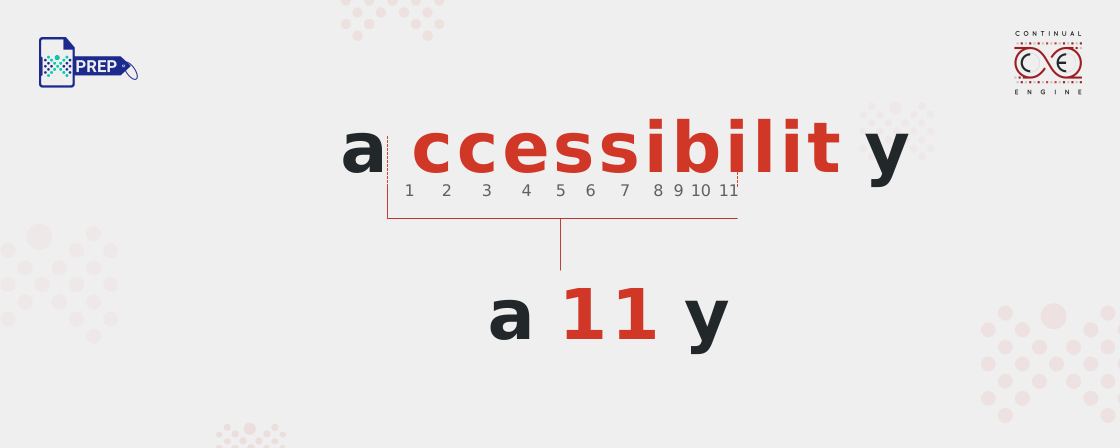
A11y is pronounced as “A-eleven-Y” or “A-one-one-Y.” The number 11 represents the eleven letters between the “A” and “Y” in the word “accessibility.” While pronouncing it as “Ally” may seem like the easy way out, it’s incorrect because those are ones, not Ls.
-
What is the line height for a11y?
The recommended line height for accessible text is at least 1.5 times the font size, with additional spacing of 0.16 times the font size after paragraphs.
-
Why is a11y important?
A11y ensures that everyone, including people with disabilities, can access and interact with digital content seamlessly. It promotes inclusion, compliance, and a better user experience.
-
What is the a11y compliance platform?
The a11y compliance platform, like Continual Engine, automates testing and remediation to identify accessibility issues and make digital content compliant with accessibility standards.
-
What is a11y testing?
A11y testing evaluates websites and applications to ensure they’re usable by everyone, including people with visual, auditory, motor, or cognitive impairments.
-
What is the difference between WCAG and a11y?
A11y is the concept of accessibility, while WCAG provides specific technical standards that guide how to achieve that accessibility.
-
What are common a11y mistakes to avoid in digital content?
Common a11y mistakes include missing alt text, poor color contrast, lack of captions or transcripts, non-keyboard-navigable interfaces, and unlabeled form fields. Avoiding these ensures better inclusivity and compliance.