Key Takeaways
- PDF standards define how documents should be structured, preserved, printed, or made accessible.
- Choosing the right PDF compliance standard ensures legal validity, accessibility, and long-term usability.
- Standards like PDF/A, PDF/X, PDF/E, and PDF/UA each serve specific needs such as archiving, printing, engineering, and accessibility.
- Using the wrong file type or skipping accessibility checks can lead to legal, usability, or compatibility issues.
- PREP automates up to 95% of remediation for PDF/UA and WCAG compliance.
The PDF, also known as Portable Document Format, is among the most commonly used file formats. Any document that is converted to or saved as a PDF follows a specific format based on the document’s intended use. The flexibility of PDFs allows them to be used across a variety of sectors and industries.
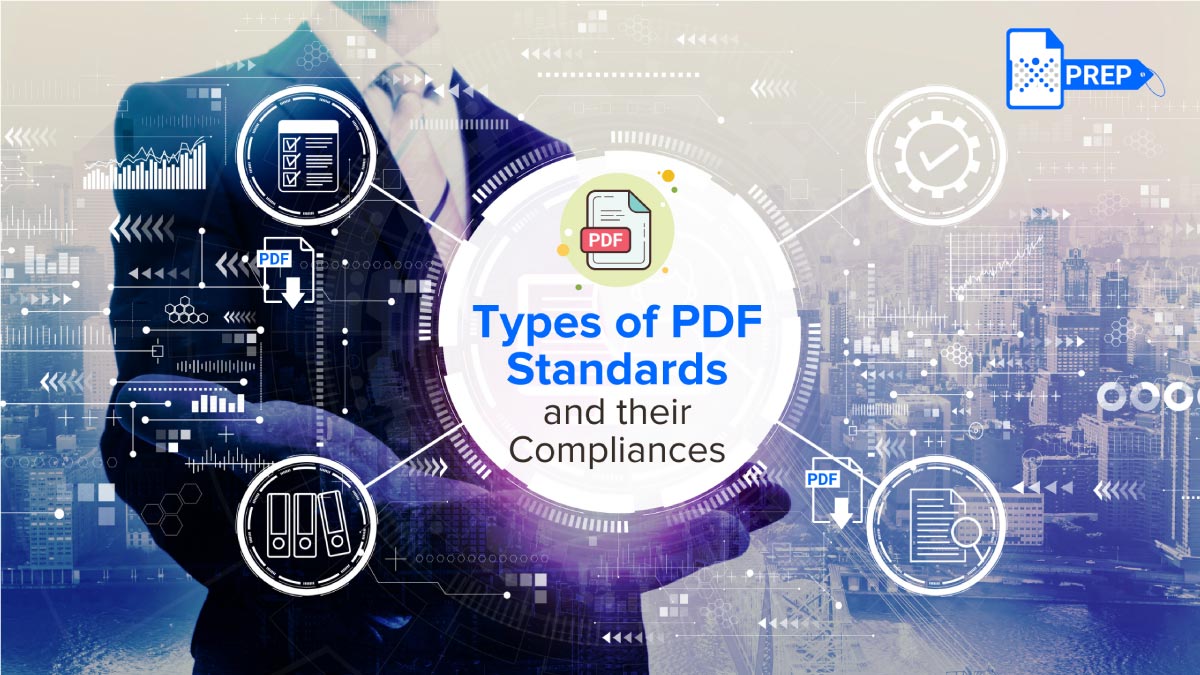
Due to this flexible nature of the PDF, it requires specific quality standards to ensure interoperability, safe access, secure and safe printing, and sharing of documents. The International Standards Organization (ISO) has established standards for PDF formats. There are eight different types of PDF standards & PDF types– six formulated according to ISO and two by other private organizations.
What Are PDF Standards?
-
What they do:
These standards ensure that PDF files maintain consistent formatting, work across devices, remain readable over time, and meet global compliance requirements like archiving, printing, engineering, or accessibility.
-
How they help organizations:
They help organizations create documents that open correctly, look consistent, follow legal requirements, and support assistive technologies to help them maintain ethical code and avoid any legal complications.
Why Are PDF Standards Important?
PDF standards play a vital role in ensuring documents remain consistent, accessible, secure, and legally compliant across industries. Because PDFs are universally used in government, healthcare, education, finance, engineering, and enterprise communication, following the right standard helps organizations maintain accuracy, preserve long-term usability, and meet regulatory demands.
-
Consistency in Layout, Structure, and Formatting
One of the biggest advantages of PDF standards is that they guarantee visual and structural consistency across platforms. Standards ensure:
- Fonts render correctly and don’t change across devices
- Colors, margins, tables, and design elements stay intact
- Reading order and hierarchy remain the same on all systems
- The layout does not break when opened with different PDF readers
PDF standards help prevent issues such as missing fonts, broken forms, incorrect color profiles, and shifted graphics or diagrams. This preserves professional quality and avoids errors that can lead to miscommunication.
-
Compliance With Legal and Regulatory Requirements
Many sectors operate under strict accessibility, data security, and records retention laws. PDF compliance helps organizations meet these mandates, such as:
- Section 508 (US Government)
- ADA Title II (Public Entities in the US)
- WCAG 2.2 AA (Digital accessibility guidelines)
- EU eIDAS regulations (Digital signatures / PAdES)
- HIPAA (Healthcare Privacy)
- ISO archival standards (PDF/A)
Non-compliant documents can result in legal penalties, loss of funding, or exclusion from procurement contracts.
-
Better Security, Authenticity, and Tamper Resistance
PDF standards like PAdES offer robust digital signature frameworks that ensure documents are authenticated, tamper-evident, and legally valid. This is essential for contracts, government notices, certificates, agreements, financial statements, and public records. By choosing the right standard, organizations balance security and longevity without compromising either.
-
Long-Term Preservation and Future Compatibility
Many files, such as government records, academic transcripts, patient medical histories, legal filings, financial statements, and research data, must remain readable for years, or even decades.
PDF/A ensures files remain self-contained and reproducible by embedding fonts, metadata, color profiles, and document structure. This PDF standard also prohibits elements that may not survive technological changes to ensure the document’s integrity remains intact even if the technology used to open it evolves.
-
Optimizing for Industry-Specific Workflows
Every industry uses PDFs differently, so standards evolved to serve those needs.
Examples:
- PDF/X ensures clean output for commercial printing by embedding color profiles and fonts.
- PDF/E supports large engineering drawings, multimedia, CAD data, and technical diagrams.
- PDF/VT focuses on variable documents for batch printing, like invoices or personalized statements.
- PDF/H supports structured medical data sharing with privacy and HIPAA considerations.
Standardized workflows reduce errors, improve interoperability, and speed up production.
Complete List of PDF Standards and PDF Types
| PDF Standard/Types | Purpose/Use Case | Key Features | Other Aspects |
|---|---|---|---|
| PDF (General) | In-house sharing and online viewing | Standard format for office documents, reliable viewing, and basic sharing | Most basic PDF compatibility; general use without specific compliance needs |
| PDF/A | Long-term archiving | Optimized for preservation; ensures self-contained documents | Variants (A-1, A-2, A-3); no encryption allowed |
| PDF/E | Engineering and construction workflows | Supports drawings, multimedia, encryption, and form fields | Used by architects, engineers, and manufacturers |
| PDF/X | Printing and graphic arts | Embedded fonts, color profiles, print-ready structure | Subsets like PDF/X-1a, PDF/X-3 |
| PDF/UA | Accessibility | Structured tags, alt text, logical reading order | Critical for WCAG and Section 508 compliance |
| PDF/VT | Variable data printing | Supports batch printing, personalized documents | Used for statements, invoices, and marketing mail |
| PAdES | Digital signatures (Legal/EU) | EU-compliant e-signatures for secure transactions | Popular for legal and government documents |
| PDF/H | Healthcare information | HIPAA-friendly, secure medical data exchange | Used for patient records and clinical workflows |
| Searchable PDF (OCR PDF) | Making scanned documents readable and text-searchable | OCR converts images of text into selectable, searchable text layers | Essential for accessibility, archiving, and screen reader compatibility; not an ISO standard |
What Are the Different Types of ISO-Defined PDF Standards Compliance?
A PDF is governed by various International Organization for Standardization (ISO) standards. The core specification is found in the ISO 32000 series, while several specialized “subset” standards address specific needs in different industries.
-
PDF – General Standard
This is the general PDF standard and is used in-office or in-house for sharing and viewing online.
-
PDF/A – Long-Term Archiving
The PDF/A format is primarily used for document management, developed especially for long-term document storage by archivists, compliance managers, and record managers. Public institutions and businesses benefit from being PDF/A compliant because digital documents are stored permanently in this standard.
All versions of this standard, from PDF/A-1, will be valid forever. However, using the most recent parts of the standard, like PDF/A-4, is practical as they natively support the current PDF version (PDF 2.0). PDF/A-4 reduces conversion efforts and allows most PDF functions.
-
PDF/E – Engineering
The PDF/E compliance standard is designed for documents used in engineering workflows, especially by architects, construction professionals, and manufacturing product teams. This PDF standard addresses costs and the convenience of storing documents with large-format drawings, multimedia, form fields, and rights management.
Like other PDF standards, PDF/E specifies how authors create the document. The compliance standard allows for security and encryption, digital rights, digital signatures, and interactive media.
-
PDF/X – Exchange and Printing
The PDF/X is known as PDF for Exchange. It best suits print and creative professionals and graphic designers to transfer visual art content effectively. This standard ensures high-quality and professional document standards.
There are 7 standards within PDF/X:
- PDF/X-1a
- PDF/X-3
- PDF/X-4
- PDF/X-4p
- PDF/X-5g
- PDF/X-5n
- PDF/X-5pg
These versions define compliance standards for embedding fonts, color profiles, storage of graphical elements, object transparency, and more.
-
PDF/UA – Accessibility
“UA” stands for Universal Accessibility. This requirement defines how images, texts, forms, and alt-texts are created so assistive technologies can access them effectively.
The PDF/UA compliance standard defines regulations for a document’s normally non-displayed tagging structure, which defines reading order and structure in paragraphs, headings, tables, columns, and alt text for images. This standard helps meet legal requirements for unrestricted access to electronic information in public institutions, insurance companies, and banks.
-
PDF/VT – Printing
The PDF/VT standard is based on components of the PDF/X standard. Like PDF/X, it is used by print professionals. This compliance standard allows data customization within files, such as bank statements, business invoices, or personalized marketing material. It is the best format for variable data printing and transactional printing.
-
Searchable PDF
A searchable PDF includes an invisible text layer added through OCR (Optical Character Recognition), allowing users to search content within scanned documents. This is essential for accessibility, compliance, and faster information retrieval.
What Are the PDF Standards From Other Organizations?
PAdES
This PDF standard is established for digital signatures in the European Union and standardizes paperless transactions that conform to EU legislation.
PDF/H – Healthcare
The PDF/H standard defines best practices and implementation guidelines to facilitate the capture, exchange, preservation, and protection of healthcare information. The guidelines make it easy for patients and doctors to share medical information. This PDF standard considers factors like security and privacy, satisfying provisions laid out by the Health Insurance Portability and Accountability Act (HIPAA).
How to Convert or Create a Standard-Compliant PDF
-
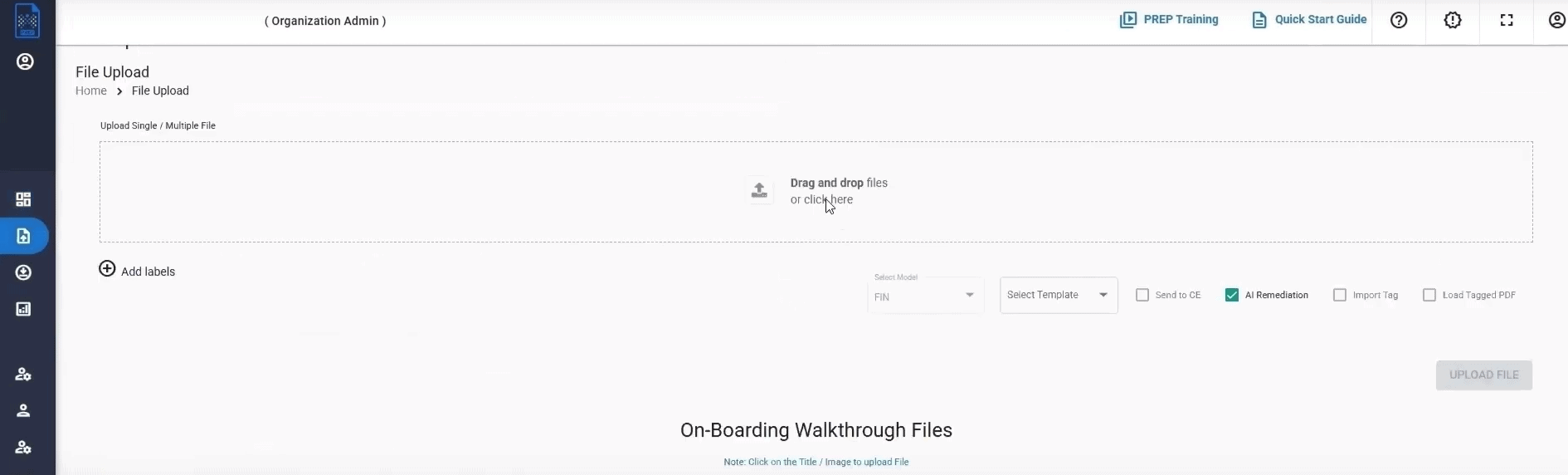
Securely Upload Your PDF Using PREP: PREP begins by allowing individuals or teams to upload documents securely through its compliance-friendly dashboard.
-
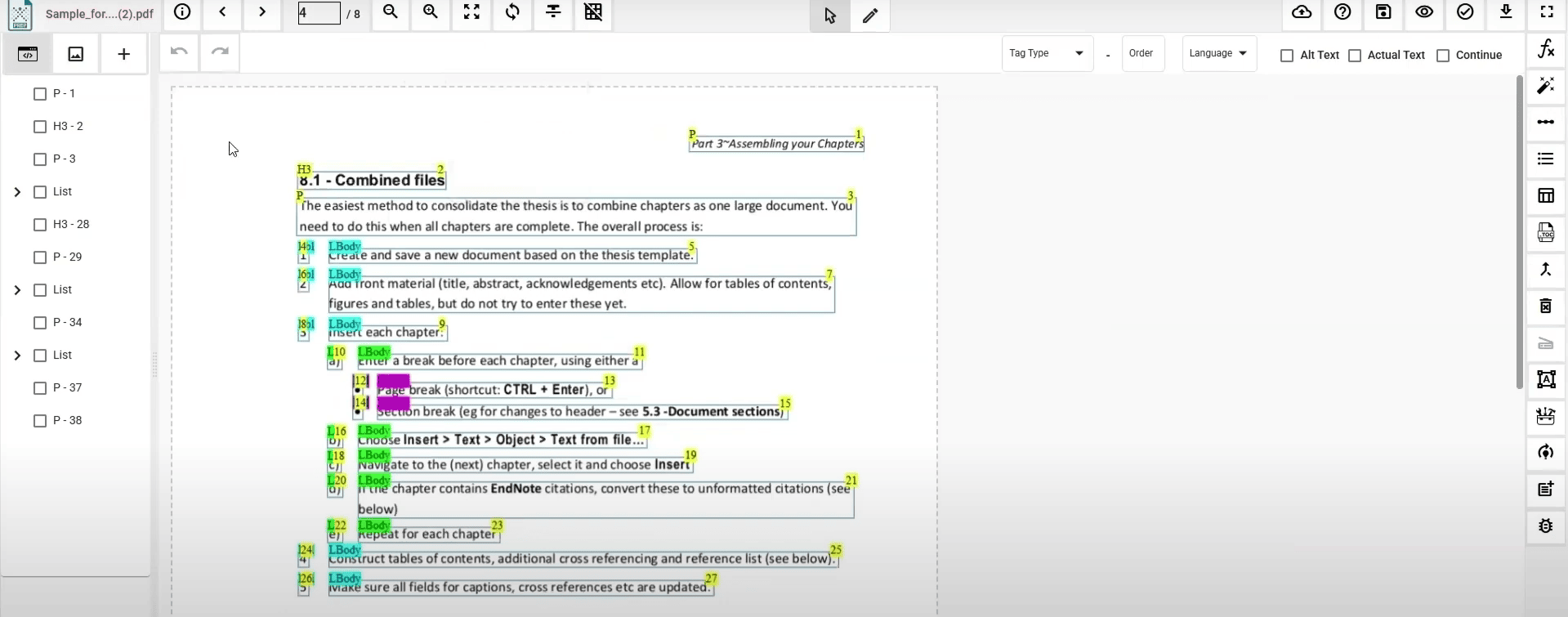
Auto-Tag Your Document: The platform automatically adds structural tags, including headings, lists, tables, and reading order.
-
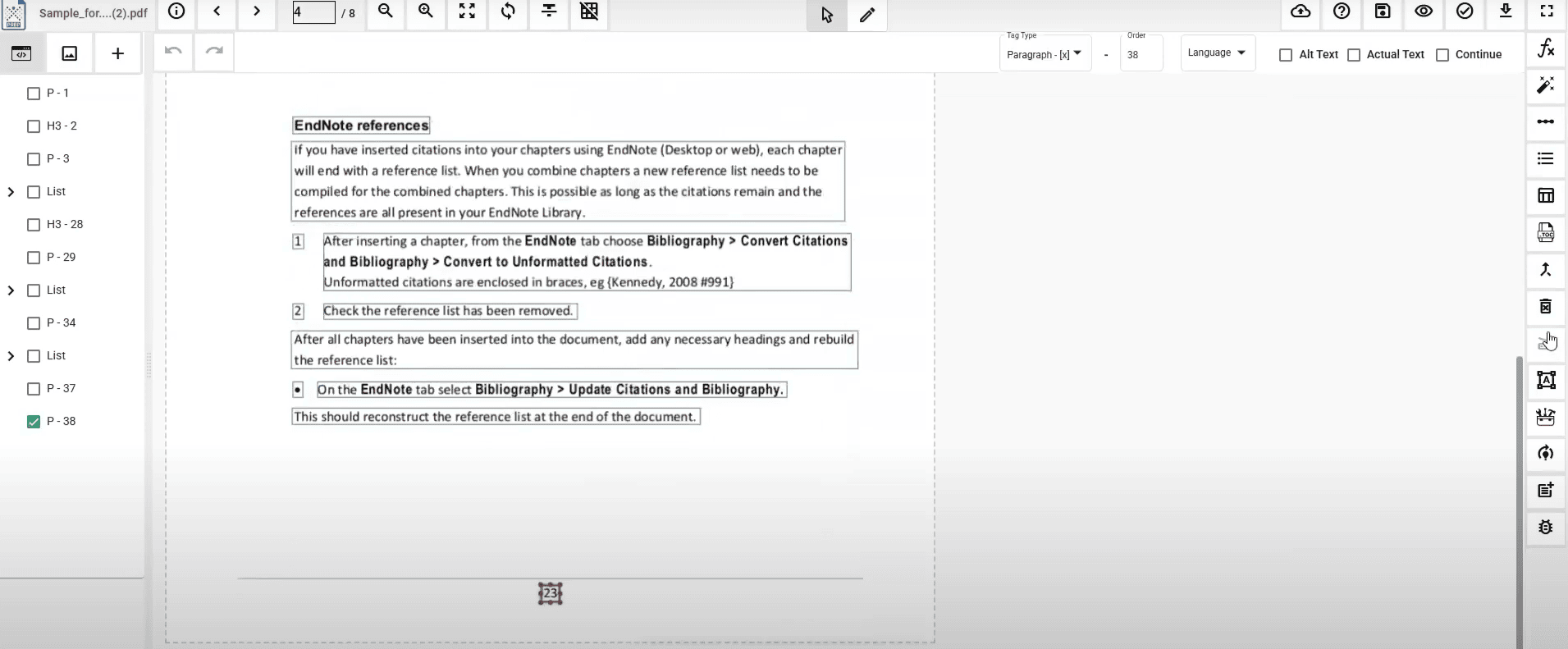
Review & Modify Tags: Users can adjust any auto-tagged element using simple controls.
-
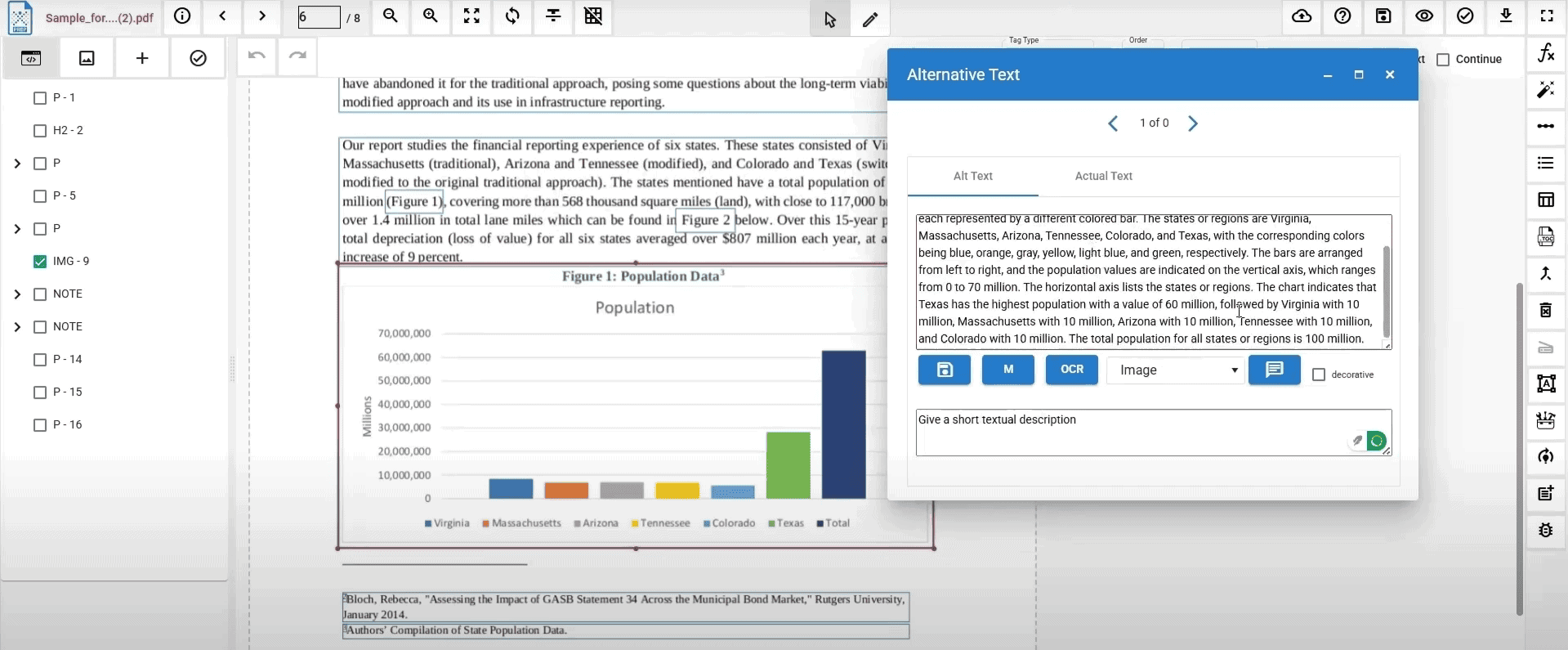
Generate Alt Text: PREP uses AI to generate alt text for images, including complex STEM visuals.
-
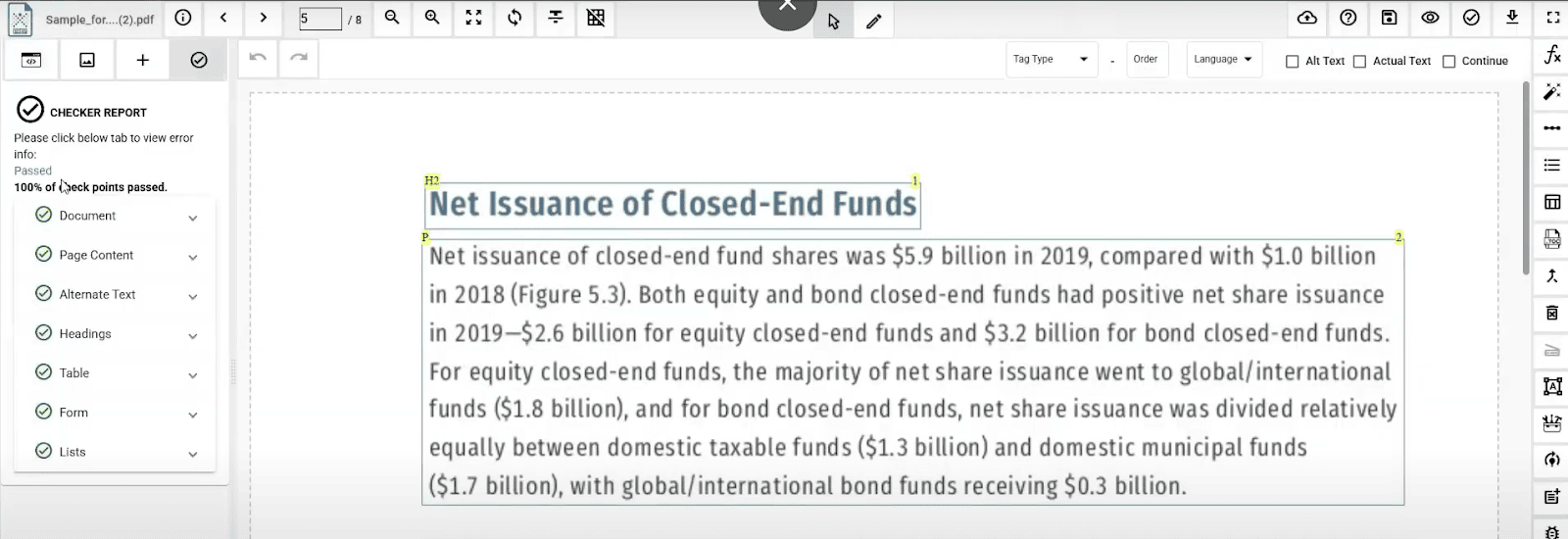
Test the Document: Using the built-in accessibility checker, validate compliance against WCAG 2.2 AA and PDF/UA standards.
-
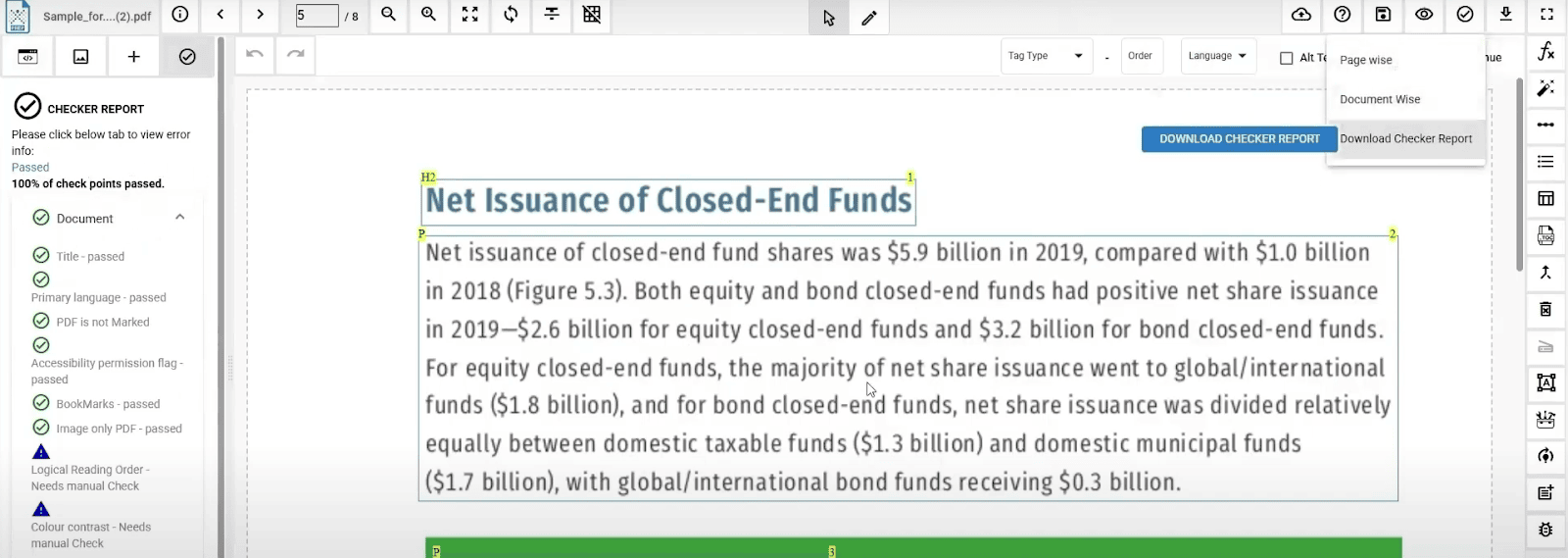
Export the Compliance Report: Teams can download a detailed report listing passed and failed checkpoints.
-
Export the Remediated PDF: Once complete, your accessible PDF is ready for distribution across government portals, LMS platforms, and enterprise systems.
Common Mistakes to Avoid While Using Different PDF Formats
- Using the Wrong PDF Standard: Selecting the incorrect standard, for example, using a PDF/X (for printing) when you need a PDF/A (for archiving), can cause print, viewing, or preservation issues.
- Ignoring Accessibility Requirements: Skipping alt text, tags, or reading order makes PDFs unusable for individuals with disabilities who rely on assistive technologies.
- Not Embedding Fonts: Without embedded fonts, the document may render incorrectly on other devices.
- Overlooking Metadata: Incomplete metadata affects searchability and compliance, especially under PDF/A requirements.
- Using Low-Resolution Images: Poor-quality visuals hinder printing and user experience.
- Failing to Verify Compliance: Always validate using tools like PAC, Adobe Preflight, or PREP’s PDF Accessibility Checker.
- Using Outdated Tools: Legacy software may not support the latest PDF standards or global PDF compliance requirements.
- Ignoring Color Profiles for Print PDFs: Incorrect ICC profiles can distort colors in professional printing workflows.
How PREP Helps in Achieving PDF Compliance
- Automatically detect accessibility issues such as missing tags, incorrect reading order, and untagged tables.
- Generate and refine semantic tagging through AI-based structure detection to meet global PDF compliance standards.
- Fix essential metadata, document titles, and language settings using guided prompts.
- Tag complex elements, like tables, lists, links, and headings, using intuitive drag-and-drop tools that reduce manual effort.
- Run built-in accessibility checks aligned with WCAG 2.2 AA and PDF/UA to validate compliance before export.
- Remediate large volumes of documents consistently using PREP’s scalable, cloud-based interface.
Want to make your PDFs compliant faster and with greater accuracy?
FAQs
-
What PDF standard should I use?
It depends on your document’s purpose:
- PDF/A - For long-term archiving and record keeping.
- PDF/X - For professional printing and publishing.
- PDF/UA - For accessibility and compliance with assistive technologies.
- PDF/E - For engineering and technical drawings.
Choose the one that best matches your end use.
-
Can I combine PDF standards?
Yes, you can combine PDFs of different standards, such as PDF/A and standard PDFs, though there are important limitations. Certified PDFs cannot be combined, and combining digitally signed PDFs will remove the signatures. To combine PDFs with different standards, you will need a PDF editor, and you should be aware that combining certain types of files, like secure, password-protected, or XFA forms, is not possible.
-
What is the latest PDF standard?
The latest PDF standard is PDF 2.0 (ISO 32000-2). This version builds upon the earlier PDF 1.7 (ISO 32000-1) standard and introduces updates related to rendering, transparency, digital signatures, metadata, and accessibility. While PDF 2.0 is the most recent version, the previous ISO 32000-1 standard remains valid and widely used.
-
How can I ensure PDF compliance with global standards?
Use tools that validate standards such as PDF/A, PDF/UA, PDF/E, or PDF/X. PREP offers a built-in accessibility checker, automated tagging, and compliance reporting to help organizations meet global requirements quickly.
-
Which PDF standard should I use for government or compliance needs?
Government organizations typically rely on PDF/A for archiving and PDF/UA for accessibility. Section 508 and ADA Title II require WCAG-compliant PDFs. For signed legal documents, use PDF/A with PAdES digital signatures.
-
How do I check if a PDF is standards-compliant?
Modern tools like Adobe Acrobat Pro and Foxit include “Preflight” or “Standards Check” features. PREP’s PDF Accessibility Checker validates against WCAG and PDF/UA requirements instantly.
-
Can a PDF comply with more than one standard?
Yes. Many sectors require dual compliance, such as PDF/A-3a for archiving combined with PDF/UA for accessibility. Some standard features may conflict, so validation is essential.
-
What are the main accessibility requirements for PDFs?
PDF/UA requires structured tagging, alt text for images, proper reading order, metadata, form labels, and full compatibility with assistive technologies. These are mandatory for public-facing government content by 2026.
-
What happens if my PDF doesn't meet compliance standards?
Non-compliant documents may become unreadable, inaccessible, or legally invalid. In regulated industries, this can result in compliance failures, fines, lawsuits, or operational delays.
-
How do PDF standards affect printing and archiving?
PDF/X ensures accurate color and layout for printing. PDF/E supports engineering workflows, while PDF/A ensures long-term preservation. Using general PDFs may lead to inaccuracies or compatibility issues.
-
How can organizations ensure ongoing PDF compliance?
Use accredited tools like PREP, train teams, schedule regular audits, and stay updated with new accessibility and PDF standard requirements across your industry.